我正在做一个太阳风暴图,几乎完成了,但我希望文本围绕圆圈翻转一半,以便于阅读。使用stackoverflow上另一个问题的帮助,我已经能够使文本翻转,但它下降了一个级别。我试图修改computeTextRotation函数来解释这一点,但没有成功。我很好奇是否有人能帮我解决这个问题。
下面是图表的图片:
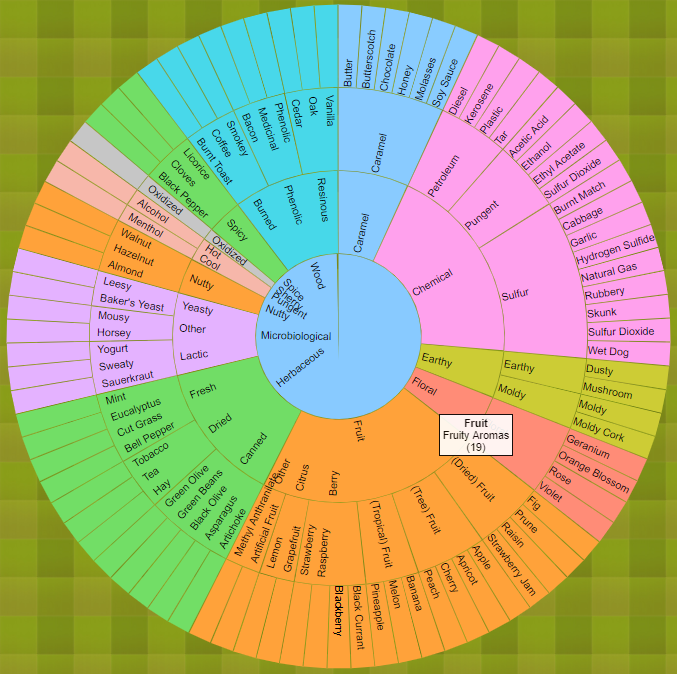
以下是computeTextRotation函数代码:
function computeTextRotation(d) {
    var rotation = (d.x + d.dx / 2) * 180 / Math.PI - 90;
    return {
        global: rotation,
        correction: rotation > 90 ? 180 : 0
    };
}
...
        .attr("transform", function(d)
          {
            var r = computeTextRotation(d);
            return "rotate(" + r.global + ")"
              + "translate(" + radius / 3. * d.depth + ")"
              + "rotate(" + -r.correction + ")";
          }
        )
以下是整个JavaScript代码:
var margin = {top: 500, right: 500, bottom: 500, left: 500},
    radius = Math.min(margin.top, margin.right, margin.bottom, margin.left) - 150;

function filter_min_arc_size_text(d, i) {return (d.dx*d.depth*radius/1)>14};

var hue = d3.scale.category10();

var luminance = d3.scale.sqrt()
    .domain([0, 1e6])
    .clamp(true)
    .range([90, 20]);

var svg = d3.select("body").append("svg")
    .attr("width", margin.left + margin.right)
    .attr("height", margin.top + margin.bottom)
    .append("g")
    .attr("transform", "translate(" + margin.left + "," + margin.top + ")");

var partition = d3.layout.partition()
    .sort(function(a, b) { return d3.ascending(a.name, b.name); })
    .size([2 * Math.PI, radius]);

var arc = d3.svg.arc()
    .startAngle(function(d) { return d.x; })
    .endAngle(function(d) { return d.x + d.dx - .01 / (d.depth + .5); })
    .innerRadius(function(d) { return radius / 3 * d.depth; })
    .outerRadius(function(d) { return radius / 3 * (d.depth + 1) - 1; });

//Tooltip description
var tooltip = d3.select("body")
    .append("div")
    .attr("id", "tooltip")
    .style("position", "absolute")
    .style("z-index", "10")
    .style("opacity", 0);

function format_number(x) {
  return x.toString().replace(/\B(?=(\d{3})+(?!\d))/g, ",");
}


function format_description(d) {
  var description = d.description;
      return  '<b>' + d.name + '</b></br>'+ d.description + '<br> (' + format_number(d.value) + ')';
}

function computeTextRotation(d) {
    var angle=(d.x +d.dx/2)*180/Math.PI - 90

    return angle;
}

function mouseOverArc(d) {
             d3.select(this).attr("stroke","black")

          tooltip.html(format_description(d));
          return tooltip.transition()
            .duration(50)
            .style("opacity", 0.9);
        }

function mouseOutArc(){
    d3.select(this).attr("stroke","")
    return tooltip.style("opacity", 0);
}

function mouseMoveArc (d) {
          return tooltip
            .style("top", (d3.event.pageY-10)+"px")
            .style("left", (d3.event.pageX+10)+"px");
}

var root_ = null;
d3.json("data/davis-aroma-wheel.json", function(error, root) {
  if (error) return console.warn(error);
  // Compute the initial layout on the entire tree to sum sizes.
  // Also compute the full name and fill color for each node,
  // and stash the children so they can be restored as we descend.

  partition
      .value(function(d) { return d.size; })
      .nodes(root)
      .forEach(function(d) {
        d._children = d.children;
        d.sum = d.value;
        d.key = key(d);
        d.fill = fill(d);
      });

  // Now redefine the value function to use the previously-computed sum.
  partition
      .children(function(d, depth) { return depth < 3 ? d._children : null; })
      .value(function(d) { return d.sum; });

  var center = svg.append("circle")
      .attr("r", radius / 3)
      .on("click", zoomOut);

  center.append("title")
      .text("zoom out");

  var partitioned_data = partition.nodes(root).slice(1)

  var path = svg.selectAll("path")
      .data(partitioned_data)
      .enter().append("path")
      .attr("d", arc)
      .style("fill", function(d) { return d.fill; })
      .each(function(d) { this._current = updateArc(d); })
      .on("click", zoomIn)
          .on("mouseover", mouseOverArc)
      .on("mousemove", mouseMoveArc)
      .on("mouseout", mouseOutArc);


  var texts = svg.selectAll("text")
      .data(partitioned_data)
      .enter().append("text")
          .filter(filter_min_arc_size_text)
        .attr("transform", function(d) { return "rotate(" + computeTextRotation(d) + ")"; })
          .attr("x", function(d) { return radius / 3 * d.depth; })
          .attr("dx", "6") // margin
      .attr("dy", ".35em") // vertical-align
        .text(function(d,i) {return d.name})

  function zoomIn(p) {
    if (p.depth > 1) p = p.parent;
    if (!p.children) return;
    zoom(p, p);
  }

  function zoomOut(p) {
    if (!p.parent) return;
    zoom(p.parent, p);
  }

  // Zoom to the specified new root.
  function zoom(root, p) {
    if (document.documentElement.__transition__) return;

    // Rescale outside angles to match the new layout.
    var enterArc,
        exitArc,
        outsideAngle = d3.scale.linear().domain([0, 2 * Math.PI]);

    function insideArc(d) {
      return p.key > d.key
          ? {depth: d.depth - 1, x: 0, dx: 0} : p.key < d.key
          ? {depth: d.depth - 1, x: 2 * Math.PI, dx: 0}
          : {depth: 0, x: 0, dx: 2 * Math.PI};
    }

    function outsideArc(d) {
      return {depth: d.depth + 1, x: outsideAngle(d.x), dx: outsideAngle(d.x + d.dx) - outsideAngle(d.x)};
    }

    center.datum(root);

    // When zooming in, arcs enter from the outside and exit to the inside.
    // Entering outside arcs start from the old layout.
    if (root === p) enterArc = outsideArc, exitArc = insideArc, outsideAngle.range([p.x, p.x + p.dx]);

     var new_data=partition.nodes(root).slice(1)

    path = path.data(new_data, function(d) { return d.key; });

     // When zooming out, arcs enter from the inside and exit to the outside.
    // Exiting outside arcs transition to the new layout.
    if (root !== p) enterArc = insideArc, exitArc = outsideArc, outsideAngle.range([p.x, p.x + p.dx]);

    d3.transition().duration(d3.event.altKey ? 7500 : 750).each(function() {
      path.exit().transition()
          .style("fill-opacity", function(d) { return d.depth === 1 + (root === p) ? 1 : 0; })
          .attrTween("d", function(d) { return arcTween.call(this, exitArc(d)); })
          .remove();

      path.enter().append("path")
          .style("fill-opacity", function(d) { return d.depth === 2 - (root === p) ? 1 : 0; })
          .style("fill", function(d) { return d.fill; })
          .on("click", zoomIn)
             .on("mouseover", mouseOverArc)
         .on("mousemove", mouseMoveArc)
         .on("mouseout", mouseOutArc)
          .each(function(d) { this._current = enterArc(d); });


      path.transition()
          .style("fill-opacity", 1)
          .attrTween("d", function(d) { return arcTween.call(this, updateArc(d)); });


    });


     texts = texts.data(new_data, function(d) { return d.key; })

     texts.exit()
             .remove()
    texts.enter()
            .append("text")

    texts.style("opacity", 0)
      .attr("transform", function(d) { return "rotate(" + computeTextRotation(d) + ")"; })
          .attr("x", function(d) { return radius / 3 * d.depth; })
          .attr("dx", "6") // margin
      .attr("dy", ".35em") // vertical-align
      .filter(filter_min_arc_size_text)
      .text(function(d,i) {return d.name})
          .transition().delay(750).style("opacity", 1)


  }
});

function key(d) {
  var k = [], p = d;
  while (p.depth) k.push(p.name), p = p.parent;
  return k.reverse().join(".");
}

function fill(d) {
  var p = d;
  while (p.depth > 1) p = p.parent;
  var c = d3.lab(hue(p.name));
  c.l = luminance(d.sum);
  return c;
}

function arcTween(b) {
  var i = d3.interpolate(this._current, b);
  this._current = i(0);
  return function(t) {
    return arc(i(t));
  };
}

function updateArc(d) {
  return {depth: d.depth, x: d.x, dx: d.dx};
}

d3.select(self.frameElement).style("height", margin.top + margin.bottom + "px");



