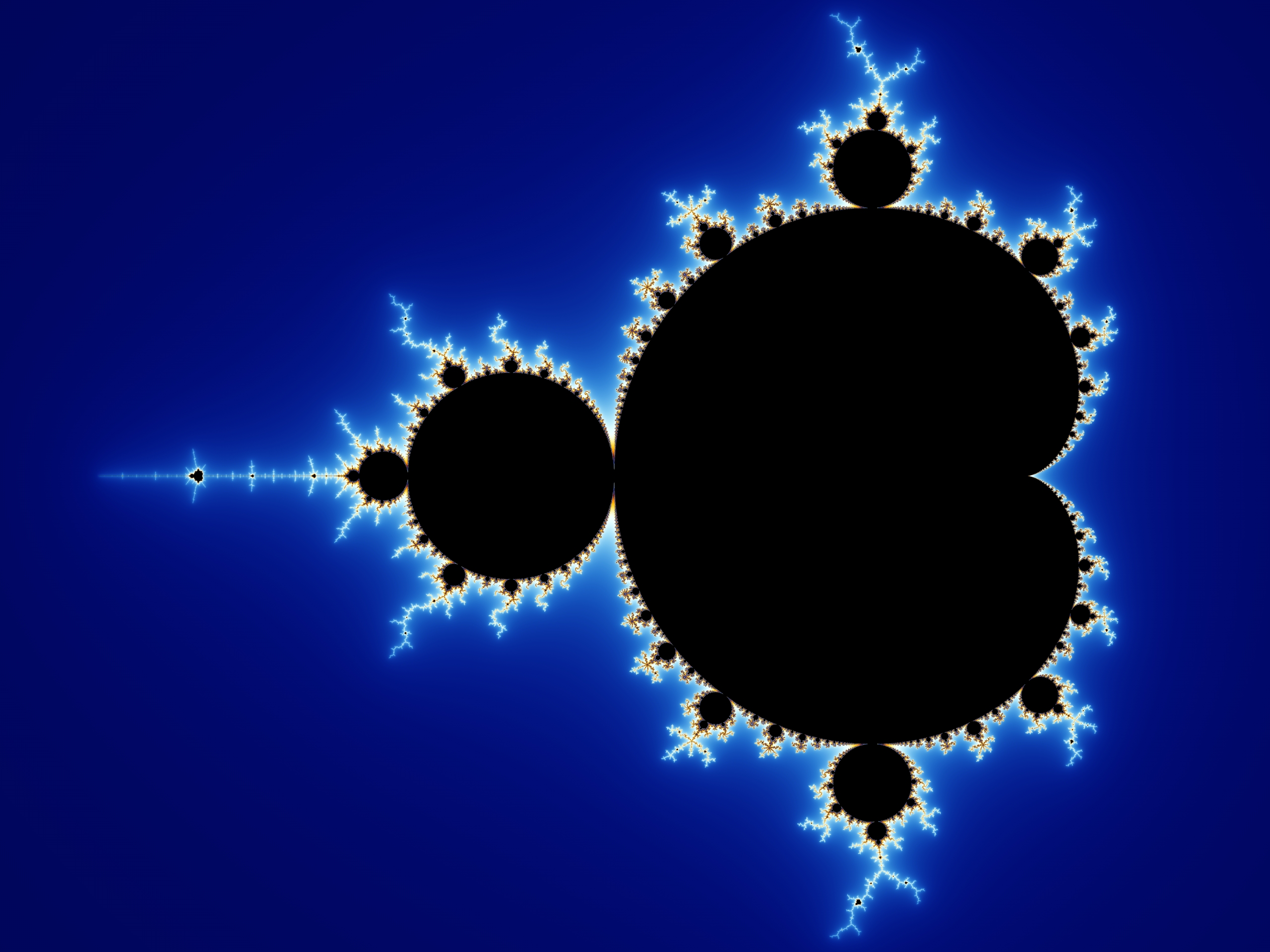
我正试图用颜色渲染曼德布罗特的布景,让它看起来很好看。我想复制
image from the Wikipedia page
维基百科的图片还包括一个超分形3参数文件。
mandelZoom00MandelbrotSet {
fractal:
  title="mandel zoom 00 mandelbrot set" width=2560 height=1920 layers=1
  credits="WolfgangBeyer;8/21/2005"
layer:
  method=multipass caption="Background" opacity=100
mapping:
  center=-0.7/0 magn=1.3
formula:
  maxiter=50000 filename="Standard.ufm" entry="Mandelbrot" p_start=0/0
  p_power=2/0 p_bailout=10000
inside:
  transfer=none
outside:
  density=0.42 transfer=log filename="Standard.ucl" entry="Smooth"
  p_power=2/0 p_bailout=128.0
gradient:
  smooth=yes rotation=29 index=28 color=6555392 index=92 color=13331232
  index=196 color=16777197 index=285 color=43775 index=371 color=3146289
opacity:
  smooth=no index=0 opacity=255
}
我一直在试图破解这个文件,并编写一个程序来重现维基百科的图像。这是我最好的尝试:

这是渲染器的一部分。这有点凌乱,因为我在四处摆弄,重写大块,试图弄明白这件事。
using real = double;
using integer = long long;

struct complex {
  real r, i;
};

using grey = unsigned char;

struct color {
  grey r, g, b;
};

struct real_color {
  real r, g, b;
};

grey real_to_grey(real r) {
  // converting to srgb didn't help much
  return std::min(std::max(std::round(r), real(0.0)), real(255.0));
}

color real_to_grey(real_color c) {
  return {real_to_grey(c.r), real_to_grey(c.g), real_to_grey(c.b)};
}

real lerp(real a, real b, real t) {
  return std::min(std::max(t * (b - a) + a, real(0.0)), real(255.0));
}

real_color lerp(real_color a, real_color b, real t) {
  return {lerp(a.r, b.r, t), lerp(a.g, b.g, t), lerp(a.b, b.b, t)};
}

complex plus(complex a, complex b) {
  return {a.r + b.r, a.i + b.i};
}

complex square(complex n) {
  return {n.r*n.r - n.i*n.i, real{2.0} * n.r * n.i};
}

complex next(complex z, complex c) {
  return plus(square(z), c);
}

real magnitude2(complex n) {
  return n.r*n.r + n.i*n.i;
}

real magnitude(complex n) {
  return std::sqrt(magnitude2(n));
}

color lerp(real_color a, real_color b, real t) {
  return real_to_grey(lerp(a, b, t));
}

struct result {
  complex zn;
  integer n;
};

result mandelbrot(complex c, integer iterations, real bailout) {
  complex z = {real{0.0}, real{0.0}};
  integer n = 0;
  real bailout2 = bailout * bailout;
  for (; n < iterations && magnitude2(z) <= bailout2; ++n) {
    z = next(z, c);
  }
  return {z, n};
}

struct table_row {
  real index;
  real_color color;
};

real invlerp(real value, real min, real max) {
  return (value - min) / (max - min);
}

color lerp(table_row a, table_row b, real index) {
  return lerp(a.color, b.color, invlerp(index, a.index, b.index));
}

color mandelbrot_color(complex c, integer iterations, real bailout) {
  const result res = mandelbrot(c, iterations, bailout);
  if (res.n == iterations) {
    // in the set
    return {0, 0, 0};
  } else {
    table_row table[] = {
      // colors and indicies from gradient section
      {28.0*0.1, {0x00, 0x07, 0x64}},
      {92.0*0.1, {0x20, 0x6B, 0xCB}},
      {196.0*0.1, {0xED, 0xFF, 0xFF}},
      {285.0*0.1, {0xFF, 0xAA, 0x00}},
      {371.0*0.1, {0x31, 0x02, 0x30}},
      // interpolate towards black as we approach points that are in the set
      {real(iterations), {0, 0, 0}}
    };
    // it should be smooth, but it's not
    const real smooth = res.n + real{1.0} - std::log(std::log2(magnitude(res.zn)));
    // I know what a for-loop is, I promise
    if (smooth < table[1].index) {
      return lerp(table[0], table[1], smooth);
    } else if (table[1].index <= smooth && smooth < table[2].index) {
      return lerp(table[1], table[2], smooth);
    } else if (table[2].index <= smooth && smooth < table[3].index) {
      return lerp(table[2], table[3], smooth);
    } else if (table[3].index <= smooth && smooth < table[4].index) {
      return lerp(table[3], table[4], smooth);
    } else {
      return lerp(table[4], table[5], smooth);
    }
  }
}
来自
gradient
部分在中的一个表中
mandelbrot_color
.来自
坡度
节也在表中,但我将它们乘以
0.1
1.如果我不乘以
0.1
.
这个
formula
部门有
maxiter=50000
和
p_bailout=10000
.这些是
iterations
和
bailout
在代码中。我不知道是什么
p_start=0/0 p_power=2/0
方法我不知道为什么在报告中提到了不同的救助方案
outside
我不知道是什么
density=0.42
,
transfer=none
,
transfer=log
方法这个
坡度
第节还提到
rotation=29
但我不明白梯度是如何旋转的。
我问这个问题的原因是我不喜欢我的图片周围的白色条纹(我更喜欢像维基百科图片中的平滑而发光)。我也不喜欢因向黑色插值而产生的深紫色皮肤(表中的最后一行)
mandelbrot_颜色
).如果我们去掉那一排,我们的皮肤就会变成深蓝色。
我怀疑有某种映射来自
坡度
第二节是迭代计数。大概
* 0.1
是该映射的近似值,在某些情况下有效。可能与此有关
transfer
,
density
或
rotation
.如果你想让我发布整个节目,请留下评论。这取决于
stb_image_write
(一个单头图像写入库)。
作为旁注,我已经清理了这段代码,并将其放入片段着色器中,它是否可能比在CPU上运行多线程更快(一般来说)?