
代码之家  ›  专栏  ›  技术社区  ›  Lewis Black

底部导航栏:按下时文本大小增加?

  •  18
  • Lewis Black  · 技术社区  · 8 年前

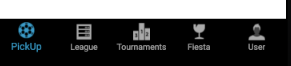
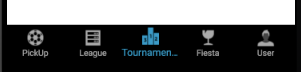
    我正在使用Android中的底部导航栏。默认情况下,当我选择一个项目时,该项目标签的文本大小会增加。正如“锦标赛”标签所示。

    enter image description here

    enter image description here

    有没有办法去掉这个词,使“锦标赛”这个词保持不变?

    6 回复  |  直到 8 年前
        1
  •  27
  •   Mitesh Vanaliya    8 年前

    尝试在中添加此代码 dimens.xml 文件

    <dimen name="design_bottom_navigation_text_size" tools:override="true">10sp</dimen>
    <dimen name="design_bottom_navigation_active_text_size" tools:override="true">10sp</dimen>
    
        2
  •  27
  •   Abhishek Garg    7 年前

    忙碌的 和 不活跃的 text通过样式显示BottomNavigationView的外观:

    <android.support.design.widget.BottomNavigationView
        android:id="@+id/navigation"
        android:layout_width="match_parent"
        android:layout_height="wrap_content"
        style="@style/BottomNavigationView"/>
    

    将以下样式放入 styles.xml 文件

    <style name="BottomNavigationView">
        <item name="itemTextAppearanceActive">@style/TextAppearance.BottomNavigationView.Active</item>
        <item name="itemTextAppearanceInactive">@style/TextAppearance.BottomNavigationView.Inactive</item>
    </style>
    
     <!-- blank styles for better code readability-->
    <style name="TextAppearance"/>
    <style name="TextAppearance.BottomNavigationView"/>
    
    <!-- inactive tab icon style -->
    <style name="TextAppearance.BottomNavigationView.Inactive">
        <item name="android:textSize">12sp</item>
    </style>
    
    <!-- active tab icon style -->
    <style name="TextAppearance.BottomNavigationView.Active">
        <item name="android:textSize">12sp</item>
    </style>
    

    使用TextAppearance,您可以控制的不仅仅是 textSize ,但也包括属性,例如 fontFamily 等

        3
  •  5
  •   Bajrang Hudda    7 年前

    如果您使用support library,您需要做两件简单的事情 28.0.0-alpha1 '或更高-

    在dimen中添加以下两行。xml文件

    <dimen name="design_bottom_navigation_text_size" tools:override="true">15sp</dimen>
    <dimen name="design_bottom_navigation_active_text_size" tools:override="true">15sp</dimen>
    

    并且在视图中-

    <android.support.design.widget.BottomNavigationView
                android:id="@+id/navigation"
                android:layout_width="0dp"
                android:layout_height="wrap_content"
                android:background="@color/colorPrimary"
                android:foreground="?attr/selectableItemBackground"
                app:itemIconTint="@color/colorAccent"
                app:itemTextColor="@color/colorAccent"
                android:elevation="16dp"
                app:layout_constraintBottom_toBottomOf="parent"
                app:layout_constraintEnd_toEndOf="parent"
                app:layout_constraintStart_toStartOf="parent"
                app:labelVisibilityMode="labeled"
                app:menu="@menu/navigation" />
    

    放 app:labelVisibilityMode="labeled"

    这就是享受:-)

        4
  •  2
  •   amiron    7 年前

    所有控件UI BottomNavigationView,如下所示。 我使用了依赖com。谷歌。安卓材质:BottomNavigationView的材质。

     private void editBottomNavigationViewItems(BottomNavigationView bottomNavigationView) {
    
            for (int i = 0; i < bottomNavigationView.getChildCount(); i++) {
    
                try {
    
                    View item = bottomNavigationView.getChildAt( i );
    
                    if (item instanceof BottomNavigationMenuView) {
    
                        BottomNavigationMenuView menu = (BottomNavigationMenuView) item;
                        for (int j = 0; j < menu.getChildCount(); j++) {
    
                            try {
    
                                View menuItem = menu.getChildAt( j );
    
                                // not chosen item menu  GO
                                View _small = menuItem.findViewById(com.google.android.material.R.id.smallLabel);//dependence com.google.android.material:material
                                //View _small = menuItem.findViewById(android.support.design.R.id.smallLabel);// dependence android.support.design
                                if ( _small instanceof TextView ) {
                                    //_small.setPadding(0, 0, 0, 0);// remove all padding
                                    TextView _tv = (TextView)_small;
                                    _tv.setTextSize( 12 );// set size text
                                }// not chosen item menu  END
    
                                //this chosen item menu GO
                                View _large = menuItem.findViewById(com.google.android.material.R.id.largeLabel);//dependence com.google.android.material:material
                                //View _large = menuItem.findViewById(android.support.design.R.id.largeLabel);//dependence android.support.design.R.id.largeLabel
                                if ( _large instanceof TextView ) {
                                    _large.setPadding(0,0,0,0);// remove all padding
                                    TextView _tv = (TextView)_large;
                                    _tv.setTextSize( 12 );// set size text
                                }// this chosen item menu  END
    
                            } catch ( NullPointerException npei ) {
                                Log.e("TAG", "get:BottomNavigationMenuView: " + npei.getMessage() );
                            }
    
                        }
    
                    }
    
                } catch ( NullPointerException npe ) {
                    Log.e("TAG", "get:BottomNavigationView: " + npe.getMessage() );
                }
    
            }
    
        }
    
        5
  •  0
  •   Ankit Lathiya    6 年前

    在onCreate()和bottom\u navigation\u菜单之前使用此方法。setOnNavigationItemSelectedListener:-

    public void removePaddingFromBottomNavigationItem() {
            BottomNavigationMenuView menuView = (BottomNavigationMenuView) bottom_navigation_menu.getChildAt(0);
            for (int i = 0; i < menuView.getChildCount(); i++) {
                BottomNavigationItemView item = (BottomNavigationItemView) menuView.getChildAt(i);
                View activeLabel = item.findViewById(R.id.largeLabel);
                if (activeLabel instanceof TextView) {
                    activeLabel.setPadding(0, 0, 0, 0);
                }
            }
        }
    

    并在样式中使用此代码。xml:-

    <style name="TextAppearance.BottomNavigationView.Inactive">
        <item name="android:textSize">@dimen/_10ssp</item>
    </style>
    
    <style name="TextAppearance.BottomNavigationView.Active">
        <item name="android:textSize">@dimen/_10ssp</item>
    </style>
    
        6
  •  0
  •   Mahmoud D. Alghraibeh    6 年前

    试着用dimen中的下划线。xml

    <dimen name="design_bottom_navigation_text_size" tools:override="true">8sp</dimen>
    <dimen name="design_bottom_navigation_active_text_size" tools:override="true">8sp</dimen>
    <dimen name="design_bottom_navigation_icon_size">15dp</dimen>
    <dimen name="design_bottom_navigation_height">45dp</dimen>