
代码之家  ›  专栏  ›  技术社区  ›  Herr von Wurst

如何调试model.fit()中的Tensorflow分段错误?

  •  5
  • Herr von Wurst  · 技术社区  · 7 年前

    Keras MINST example 我的环境是Linux系统上的Anaconda。

    Using TensorFlow backend.
    Device mapping:
    /job:localhost/replica:0/task:0/device:GPU:0 -> device: 0, name: GeForce RTX 2080, pci bus id: 0000:01:00.0, compute capability: 7.5
    x_train shape: (60000, 28, 28, 1)
    60000 train samples
    10000 test samples
    Train on 60000 samples, validate on 10000 samples
    Epoch 1/12
    conv2d_1/random_uniform/RandomUniform: (RandomUniform): 
    /job:localhost/replica:0/task:0/device:GPU:0
    conv2d_1/random_uniform/sub: (Sub): 
    /job:localhost/replica:0/task:0/device:GPU:0
    conv2d_1/random_uniform/mul: (Mul): 
    /job:localhost/replica:0/task:0/device:GPU:0
    conv2d_1/random_uniform: (Add): 
    /job:localhost/replica:0/task:0/device:GPU:0
    [...]
    

    training/Adadelta/Const_31: (Const): /job:localhost/replica:0/task:0/device:GPU:0
    training/Adadelta/mul_46/x: (Const): /job:localhost/replica:0/task:0/device:GPU:0
    training/Adadelta/mul_47/x: (Const): /job:localhost/replica:0/task:0/device:GPU:0
    Segmentation fault (core dumped)
    

    通过阅读,我认为这可能是内存问题,并添加了以下行以防止GPU内存不足:

    config = tf.ConfigProto(log_device_placement=True)
    config.gpu_options.per_process_gpu_memory_fraction=0.3
    K.tensorflow_backend.set_session(tf.Session(config=config))
    

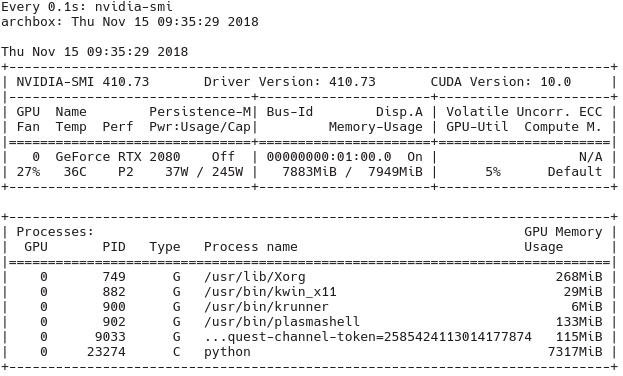
    正在检查 nvidia-smi GPU实际使用的工具( watch -n1 nvidia-smi )我可以从以下输出中确认(在本次运行中 per_process_gpu_memory_fraction

    enter image description here

    我怀疑CUDA、Keras和Tensorflow之间的版本不兼容是问题所在,但我不知道如何调试这个。

    有哪些调试措施可以解决这个问题?还有什么其他问题可能是这个错误的原因?

    编辑:我做了进一步的实验,用以下代码替换模型效果很好:

    model = keras.Sequential([
        keras.layers.Flatten(input_shape=input_shape),
        keras.layers.Dense(128, activation=tf.nn.relu),
        keras.layers.Dense(10, activation=tf.nn.softmax)
    ])
    

    然而,一旦我引入一个卷积层,就像这样

    model = keras.Sequential([
        keras.layers.Conv2D(32, kernel_size=(3, 3), activation='relu', input_shape=input_shape),
    #    keras.layers.Flatten(input_shape=input_shape),
        keras.layers.Flatten(),
        keras.layers.Dense(128, activation=tf.nn.relu),
        keras.layers.Dense(10, activation=tf.nn.softmax)
    

    ])

    然后我又犯了上述错误。

    • 条件4.5.11
    • python 3.6.6版
    • keras gpu 2.2.4
    • tensorflow 1.12.0版
    • 第7.2.1节
    • cudatoolkit 9.2版

    编辑:我在一个非水蟒的环境中尝试了同样的代码,它工作得非常完美。我更喜欢使用巨蟒虽然,以避免系统更新打破东西。

    3 回复  |  直到 7 年前
        1
  •  7
  •   bhagath    7 年前

    Build from Source

    我的GPU:RTX 2070 Python 3.5.2版 Nvidia驱动程序410.78 张力-5.0.0

    内部版本:tensorflow-1.13.0rc0-cp35-cp35m-linux\u x86\u 64

    从下载预构建 https://github.com/tensorflow/tensorflow/issues/22706

        2
  •  3
  •   Obnebion    7 年前

    在与Francois非常相似的系统上,我遇到了完全相同的问题,但使用RTX2070时,当使用GPU上执行的conv2d函数时,我可以可靠地再现分段错误。我的设置:

    • Ubuntu:18.04版本
    • GPU:RTX 2070
    • 原因:7
    • 使用python3.6的conda

    从源头构建tensorflow https://gist.github.com/Brainiarc7/6d6c3f23ea057775b72c52817759b25c

    这基本上类似于《源代码指南》中的任何其他构建tensorflow,在我的示例中包括以下步骤:

    1. insalling bazel公司
    2. 从git克隆tensorflow并运行 ./configure
    3. bazel build

    在构建过程中出现了一些小问题,其中一个问题通过手动安装3个包来解决,使用:

    pip install keras_applications==1.0.4 --no-deps
    pip install keras_preprocessing==1.0.2 --no-deps
    pip install h5py==2.8.0
    

    我在这里找到了答案: Error Compiling Tensorflow From Source - No module named 'keras_applications'

    但是,由于所有这些都花费了相当长的时间(从源代码构建需要一个多小时,不包括在internet上搜索解决方案),因此我建议在系统正常工作后对其进行备份,例如使用timeshift或任何其他您喜欢的程序。

        3
  •  2
  •   Francois Robert    7 年前

    • 显卡:GeForce RTX 2080
    • CUDA:CUDA\ U 10.0.130\ U 410
    • CUDNN:CUDNN-10.0-linux-x64-v7.4.2
    • 使用python3.6的conda

    https://github.com/tensorflow/tensorflow/issues/24383

    所以应该有个解决办法 . 解决了这个问题