代码之家  ›  专栏  ›  技术社区  ›  Todd Padwick

使用Swiper JS slider-我想将第一张幻灯片左对齐,并在屏幕外显示第二张幻灯片的峰值

  •  3
  • Todd Padwick  · 技术社区  · 9 年前

    我正在使用 swiper JS 设置为使用以下设置覆盖流。

    var swiper = new Swiper('.swiper-container', {
        pagination: '.swiper-pagination',
        effect: 'coverflow',
        grabCursor: true,
        centeredSlides: true,
        slidesPerView: 1,
        loop: true,
        coverflow: {
            rotate: 40,
            stretch: 0,
            depth: 50,
            modifier: 1,
            slideShadows : false
        }
    });
    

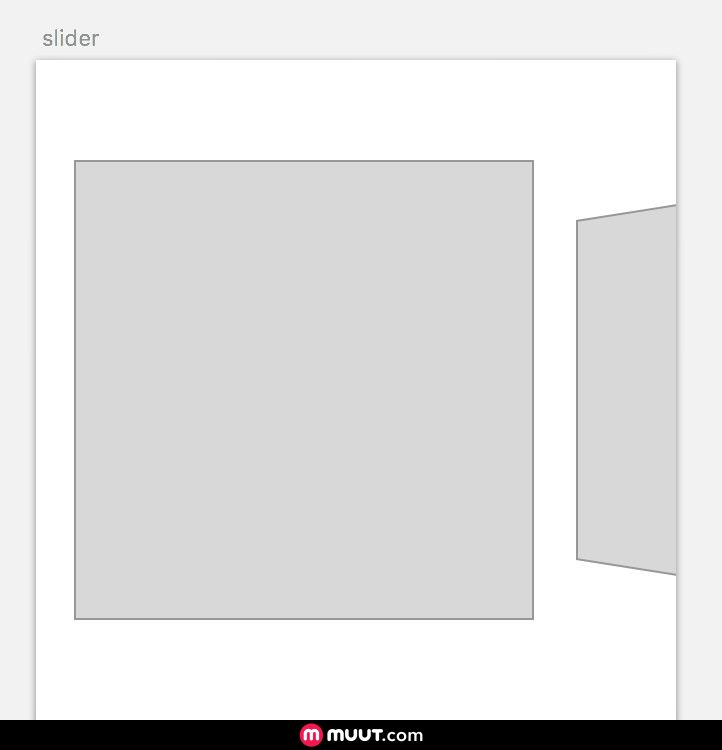
    不过,我想在屏幕右侧显示下一张幻灯片的一部分(可能是20%)。我不希望幻灯片居中,但仍然希望覆盖3D效果。

    slider mockup

    我感谢您提供的任何帮助:)

    2 回复  |  直到 9 年前
        1
  •  4
  •   qbeauperin    8 年前

    将刷子放入容器中,将刷子宽度设置为您希望活动幻灯片的宽度(例如80%),不要忘记设置 overflow 属性到 visible 对于swiper和 hidden

    (function($){
      $(document).ready(function(){
        var swiper = new Swiper('.swiper', {
          effect: 'coverflow',
          grabCursor: true,
          slidesPerView: 1,
          loop: true,
          coverflow: {
            rotate: 40,
            stretch: 0,
            depth: 50,
            modifier: 1,
            slideShadows : false
          }
        })
      });
    })(jQuery);
    .container {
      width: 150px;
      height: 100px;
      padding: 20px 10px;
      background-color: lightgrey;
      overflow: hidden;
      margin: 0 auto;
    }
    .swiper {
      width: 80%;
      height: 100%;
    }
    .swiper-slide {
      background: white;
    }
    <link href="https://cdnjs.cloudflare.com/ajax/libs/Swiper/4.1.0/css/swiper.css" rel="stylesheet"/>
    <script src="https://cdnjs.cloudflare.com/ajax/libs/Swiper/4.1.0/js/swiper.js"></script>
    <script src="https://ajax.googleapis.com/ajax/libs/jquery/2.1.1/jquery.min.js"></script>
    
    <div class="container">
      <div class="swiper">
        <div class="swiper-wrapper">
          <div class="swiper-slide"></div>
          <div class="swiper-slide"></div>
          <div class="swiper-slide"></div>
          <div class="swiper-slide"></div>
          <div class="swiper-slide"></div>
        </div>
      </div>
    </div>

    唯一的问题是 loop: true 参数,如同在上一张幻灯片上一样,下一张幻灯片似乎仅在幻灯片事件发生时添加。

        2
  •  2
  •   3rdi    5 年前

    https://swiperjs.com/ 使用以下代码段作为示例。这对我很有效。

    var swiper = new Swiper('.swiperX', {
      initialSlide: 0,
      slidesPerGroup: 1, // helps it to align in the left if set to 1
    });