|
|
1
Gerardo Furtado
8 年前
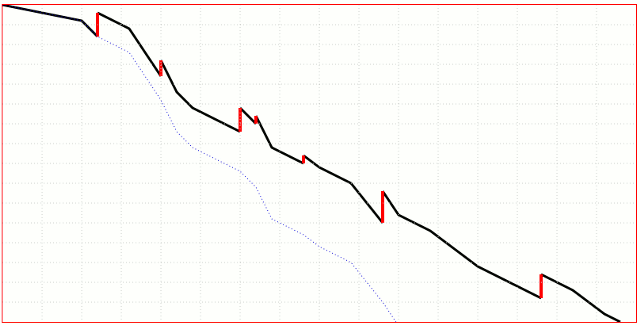
简单地说:您不能为SVG的不同段设置样式
<path>
像这样的元素。
不过,还有其他选择。例如,在这里,我只是在中添加一个键/值对
actual
...
actualRaw.map(line => {
actual.push({
date: line.date,
points: line.done,
class: 'la'
});
actual.push({
date: line.date,
points: line.done + line.added,
class: 'ln',
added: line.added//this one here...
});
})
... 并使用它绘制简单的线(即SVG)
<line>
var redLines = chart.selectAll(null)
.data(actual.filter(function(d) {
return d.added
}))
.enter()
.append("line")
.attr("x1", function(d) {
return x(d.date)
})
.attr("x2", function(d) {
return x(d.date)
})
.attr("y1", function(d) {
return y(d.points)
})
.attr("y2", function(d) {
return y(d.points - d.added)
})
.style("stroke", "red");
以下是包含这些更改的代码:
<head>
<title>Burn baby burn</title>
<script src="https://d3js.org/d3.v4.min.js"></script>
<style type="text/css">
.chart {
border: 1px solid black;
}
.chart div {
font: 10px sans-serif;
background-color: steelblue;
text-align: right;
padding: 3px;
margin: 1px;
color: white;
}
.chart rect {
stroke: white;
fill: steelblue;
}
.axis path,
.axis line {
fill: none;
stroke: #000;
shape-rendering: crispEdges;
}
.line {
fill: none;
stroke-width: 2px;
}
.line.ideal {
stroke: steelblue;
}
.la {
fill: none;
stroke-width: 2px;
stroke: green;
}
.ln {
fill: none;
stroke: red;
stroke-width: 4px;
}
</style>
</head>
<body>
<h1>Burn Chart</h1>
<script type="text/javascript">
var margin = {
top: 20,
right: 20,
bottom: 30,
left: 50
},
width = 960 - margin.left - margin.right,
height = 500 - margin.top - margin.bottom;
var x = d3.scaleTime()
.range([0, width]);
var y = d3.scaleLinear()
.range([height, 0]);
var ideal = [{
date: new Date(2017, 1, 1),
points: 50
}, {
date: new Date(2017, 12, 31),
points: 0
}];
var actualRaw = [{
date: new Date(2017, 1, 1),
added: 0,
done: 50
}, {
date: new Date(2017, 1, 15),
added: 10,
done: 40
}, {
date: new Date(2017, 2, 1),
added: 0,
done: 40
}, {
date: new Date(2017, 3, 1),
added: 20,
done: 30
}, {
date: new Date(2017, 4, 1),
added: 10,
done: 20
}, {
date: new Date(2017, 5, 1),
added: 5,
done: 10
}, {
date: new Date(2017, 6, 1),
added: 0,
done: 10
}, {
date: new Date(2017, 7, 1),
added: 5,
done: 10
}, {
date: new Date(2017, 8, 1),
added: 0,
done: 10
}, {
date: new Date(2017, 9, 1),
added: 20,
done: 20
}, {
date: new Date(2017, 10, 1),
added: 0,
done: 10
}, {
date: new Date(2017, 11, 1),
added: 5,
done: 10
}, {
date: new Date(2017, 12, 1),
added: 0,
done: 0
}];
var actual = [];
actualRaw.map(line => {
actual.push({
date: line.date,
points: line.done,
class: 'la'
});
actual.push({
date: line.date,
points: line.done + line.added,
class: 'ln',
added: line.added
});
})
var idealLine = d3.line()
.x(function(d) {
return x(d.date);
})
.y(function(d) {
return y(d.points);
});
var actualLine = d3.line()
.x(function(d) {
return x(d.date);
})
.y(function(d) {
return y(d.points);
});
x.domain(d3.extent(ideal, function(d) {
return d.date;
}));
y.domain(d3.extent(actual, function(d) {
return d.points;
}));
var xAxis = d3.axisBottom()
.scale(x)
.tickFormat(d3.timeFormat("%b %d"));
var yAxis = d3.axisLeft()
.scale(y);
var chart = d3.select("body").append("svg")
.attr("class", "chart")
.attr("width", width + margin.left + margin.right)
.attr("height", height + margin.top + margin.bottom)
.append("g")
.attr("transform", "translate(" + margin.left + "," + margin.top + ")");
// Create the x-axis
chart.append("g")
.attr("class", "x axis")
.attr("transform", "translate(0," + height + ")")
.call(xAxis);
// Create the y-axis
chart.append("g")
.attr("class", "y axis")
.call(yAxis)
.append("text")
.attr("transform", "rotate(-90)")
.attr("y", 6)
.attr("dy", ".71em")
.style("text-anchor", "end")
.text("Points");
// Paint the ideal line
chart.append("path")
.datum(ideal)
.attr("class", "line ideal")
.attr("d", idealLine);
var counter = 0;
// Paint the actual line
    chart.append("path")
        .datum(actual)
        .attr("class", function(d, i) {
            return 'line ' + d[i].class;
        })
        .attr("d", actualLine);
var redLines = chart.selectAll(null)
.data(actual.filter(function(d) {
return d.added
}))
.enter()
.append("line")
.attr("x1", function(d) {
return x(d.date)
})
.attr("x2", function(d) {
return x(d.date)
})
.attr("y1", function(d) {
return y(d.points)
})
.attr("y2", function(d) {
return y(d.points - d.added)
})
.style("stroke", "red")
.style("stroke-width", 4);
</script>
</body>
|