
代码之家  ›  专栏  ›  技术社区  ›  Roast

如何允许用户移动窗体上的控件

  •  7
  • Roast  · 技术社区  · 15 年前

    控件(目前)是一条垂直线:带有边框的标签,宽度为1。

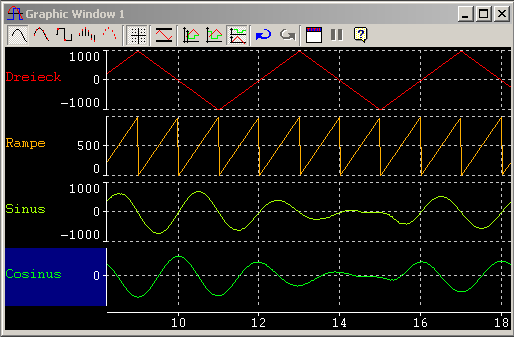
    上下文不是很重要,但我还是会告诉你的。我有一些图形的背景,我希望用户能够幻灯片上的图形指导方针。图形是用NPlots库制作的。它看起来像这样: http://www.ibme.de/pictures/xtm-window-graphic-ramp-signals.png

    5 回复  |  直到 15 年前
        1
  •  9
  •   CodingGorilla    15 年前

    这方面的代码可能有点复杂,但实际上需要在窗体上捕获MouseDown、MouseMove和MouseUp事件。像这样:

    public void Form1_MouseDown(object sender, MouseEventArgs e)
    {
        if(e.Button != MouseButton.Left)
            return;
    
        // Might want to pad these values a bit if the line is only 1px,
        // might be hard for the user to hit directly
        if(e.Y == myControl.Top)
        {
            if(e.X >= myControl.Left && e.X <= myControl.Left + myControl.Width)
            {
                _capturingMoves = true;
                return;
            }
        }
    
        _capturingMoves = false;
    }
    
    public void Form1_MouseMove(object sender, MouseEventArgs e) 
    {
        if(!_capturingMoves)
            return;
    
        // Calculate the delta's and move the line here
    }
    
    public void Form1_MouseUp(object sender, MouseEventArgs e) 
    {
        if(_capturingMoves)
        {
            _capturingMoves = false;
            // Do any final placement
        }
    }
    
        2
  •  3
  •   KeithS    15 年前

    在WinForms中,可以处理控件的MouseDown、MouseMove和MouseUp事件。在MouseDown上,设置一些位或引用来告诉窗体单击鼠标的控件,并从MouseEventArgs捕获鼠标的X和Y。在MouseMove上,如果设置了控件,则根据上次捕获的X和Y与当前坐标之间的差来调整其X和Y。在MouseUp上,释放控件。

    我会为此设置一个“编辑模式”;当用户进入此模式时,窗体控件的当前事件处理程序应该分离,移动处理程序应该附加。如果您想持久化或还原这些更改(比如您正在制作一个自定义窗体设计器,您的客户端可以使用它来自定义窗口布局),您还需要能够对控件的前后布局进行某种快照。

        3
  •  2
  •   Thomas Levesque    11 年前

    我编写了一个组件来实现这一点:在窗体上移动控件(或在屏幕上移动无边界窗体)。您甚至可以从设计器中使用它,而无需编写任何代码。

    http://www.thomaslevesque.com/2009/05/06/windows-forms-automatically-drag-and-drop-controls-dragmove/

        4
  •  0
  •   Richard Anthony Hein    15 年前

    Rx 基于 A Brief Introduction to the Reactive Extensions for .NET, Rx 邮寄和样品由Wes Dyer。

    public static class FormExtensions
    {
        public static void EnableDragging(this Control c)
        {
            // Long way, but strongly typed.        
            var downs =
                from down in Observable.FromEvent<MouseEventHandler, MouseEventArgs>(
                    eh => new MouseEventHandler(eh),
                    eh => c.MouseDown += eh,
                    eh => c.MouseDown -= eh)
                select new { down.EventArgs.X, down.EventArgs.Y };
    
            // Short way.        
            var moves = from move in Observable.FromEvent<MouseEventArgs>(c, "MouseMove")
                        select new { move.EventArgs.X, move.EventArgs.Y };
    
            var ups = Observable.FromEvent<MouseEventArgs>(c, "MouseUp");
    
            var drags = from down in downs
                        from move in moves.TakeUntil(ups)
                        select new Point { X = move.X - down.X, Y = move.Y - down.Y };
    
            drags.Subscribe(drag => c.SetBounds(c.Location.X + drag.X, c.Location.Y + drag.Y, 0, 0, BoundsSpecified.Location));
        }
    }
    

    用法:

    Button button1=新建按钮();

        5
  •  0
  •   Community Mohan Dere    13 年前

    老实说,有一种更简单的方法,初始化一个全局布尔变量,不管你喜欢什么,在这里, isMouseClicked . 在您的控件上,您希望允许拖动您转到它的鼠标按下事件,

    确保这些事件是控件事件而不是窗体事件。

    if (e.button == MouseButtons.left)
        //this is where you set the boolean to true
    

    if (isMouseClicked == true)
        //You then set your location of your control. See below:
        Button1.Location = new Point(MousePosition.X, MousePosition.Y);
    

    在你的鼠标上一定要设置你的 已单击鼠标 false ;

    推荐文章