代码之家  ›  专栏  ›  技术社区  ›  user118967

我在Windows 10中安装了GPU和CUDA,但Pytorch的torch.CUDA.is\u available()返回false;我怎样才能纠正这个问题?

  •  0
  • user118967  · 技术社区  · 7 年前

    我已将PyTorch安装在Windows 10机器上,并带有Nvidia GTX 1050 GPU。我已经安装了CUDA工具包,并使用 Nvidia instructions 这一切进展顺利,包括执行建议的测试。

    torch.cuda.is_available() 返回 False . 我怎样才能解决这个问题?

    0 回复  |  直到 7 年前
        1
  •  5
  •   Aditya Saini sarjit07    5 年前

    我也有同样的问题。 a=torch.cuda.FloatTensor() ,给出了断言错误 AssertionError: Torch not compiled with CUDA enabled

    步骤:

    1. 通过调用以下命令,确保已取消安装Pytorch:

      pip uninstall torch

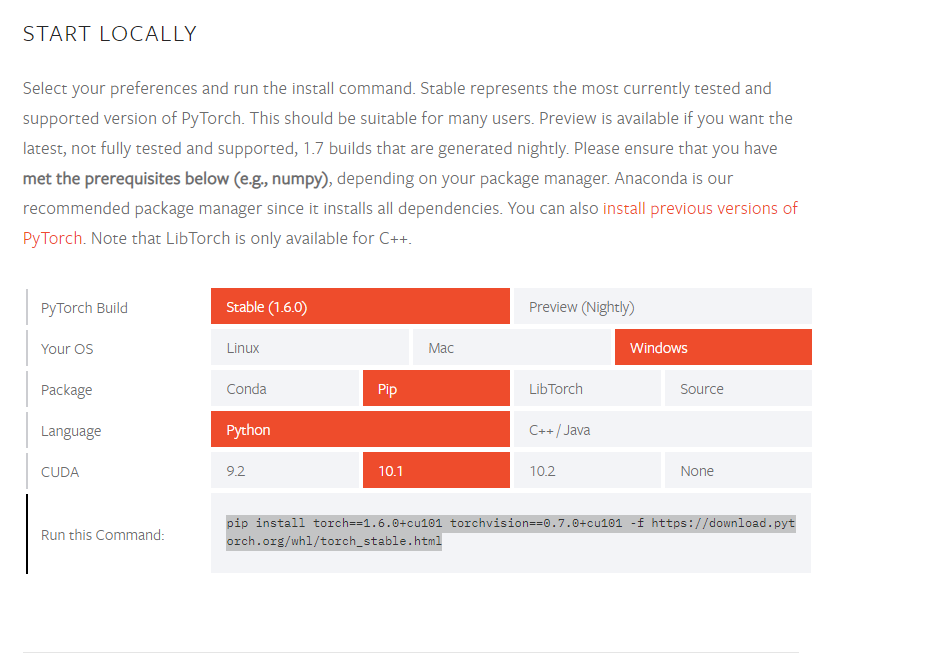
    2. 去 https://pytorch.org/get-started/locally/

    3. 从中复制确切的命令 Run this command 对话框,并在终端上运行它。

    enter image description here

        2
  •  1
  •   Ted Shaowang    5 年前

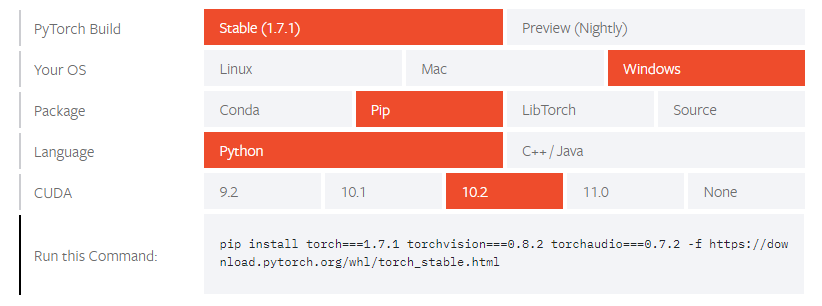
    我也有同样的问题,结果是我通过运行 https://pytorch.org/get-started/locally/

    如果你像我一样安装了CUDA 10.2,网站可能会给你 pip install torch===1.7.1 torchvision===0.8.2 torchaudio===0.7.2 -f https://download.pytorch.org/whl/torch_stable.html ,其中 不显式指定CPU或GPU。

    wrong command to install

    在我的情况下,它让我 cpu/torch-1.7.1%2Bcpu-cp38-cp38-win_amd64.whl cu102/torch-1.7.1-cp38-cp38-win_amd64.whl 为我的CUDA 10.2。

    我的解决办法是,直接转到 https://download.pytorch.org/whl/torch_stable.html

    pip install --no-cache-dir --force-reinstall torch===1.7.1 torchvision===0.8.2 -f .\Downloads\