代码之家  ›  专栏  ›  技术社区  ›  eric2323223

蚁群任务中的相对路径问题

  •  1
  • eric2323223  · 技术社区  · 16 年前

    我已经设置了一个Ant脚本作为EclipseBuilder来自动运行我的所有测试,如下所示:

    <project name="auto-test" default="test">
        <property name="tst-dir" location="C:\STAF\services\custom\TopCoder\bin" />
        <path id="classpath.base" />
        <path id="classpath.test">
            <pathelement location="D:\eclipse\eclipse\plugins\org.junit4_4.3.1\junit.jar" />
            <pathelement location="${tst-dir}" />
            <path refid="classpath.base" />
    
        </path>
        <target name="test" description="Run the tests">
            <junit>
                <classpath refid="classpath.test" />
                <formatter type="brief" usefile="false" />
                <test name="testDataGenerator.test.AllTests" />
            </junit>
        </target>
    </project>
    

    在我将测试夹具文件从绝对路径更改为相对路径之前,一切都很好:

    SAXReader reader = new SAXReader();
    Document document = reader.read(new File(".").getCanonicalPath()+"\\conf\\TestData.xml");
    

    蚂蚁任务现在尝试打开 d:\eclipse\eclipse\conf\testdata.xml文件 而不是 C:\staf\services\custom\topcoder\conf\testdata.xml 我还尝试从Eclipse手动运行所有测试,一切都很好。

    以前有人遇到过类似的问题吗?

    事先谢谢。

    ps.ant_home=d:\eclipse\eclipse\plugins\org.apache.ant_1.7.0.v200706080842

    跟进: 我尝试从命令行运行Ant脚本,并找到以下内容:

    1. C:\staf\services\custom\topcoder>ant-F C:\staf\services\custom\topcoder\task\build.xml ,Ant脚本工作正常。

    2. C:>ant-F C:\staf\services\custom\topcoder\task\build.xml ,脚本将声明:[junit]c:\conf\testdata.xml(系统找不到指定的路径)

    我还检查了EclipseBuilder设置,似乎没有什么可以将路径更改为 D:\eclipse\eclipse。

    3 回复  |  直到 16 年前
        1
  •  1
  •   kgiannakakis    16 年前

    Java解析对应于当前用户目录的相对路径,该路径通常是从Java程序调用的目录。

    克服这个问题的一种方法是为基本路径定义一个环境变量。然后,您可以轻松地使用“相对路径”(也就是说,通过连接基本路径和相对路径来创建绝对路径)。

        2
  •  1
  •   Community Mohan Dere    9 年前

    以下是我找到的解决方案:

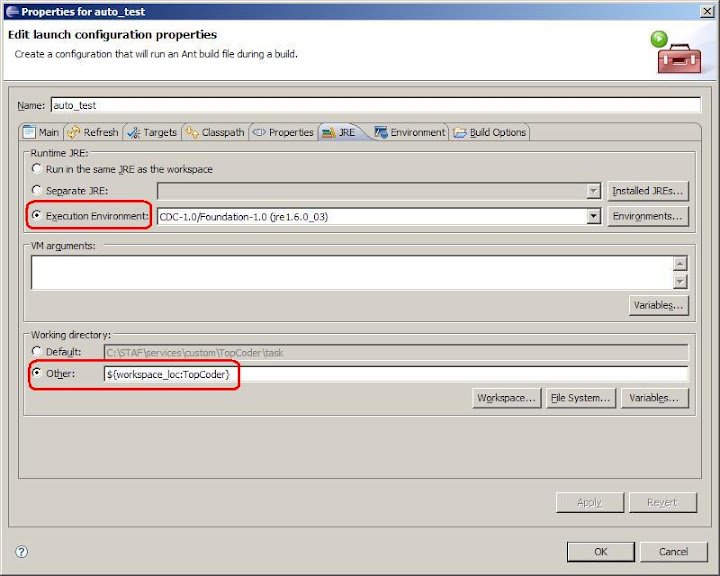
    正如kgiannakakis所提到的,Ant也从它被调用的位置开始执行它的任务,所以我们只需要更改自定义Eclipse构建器的工作目录设置。

    1. 在JRE选项卡中,选择“执行环境”。

    2. 将工作目录更改为当前工作区。

    它被调用,所以我们只需要更改定制Eclipse构建器的工作目录设置。

    1. 在JRE选项卡中,选择“执行环境”。

    2. 将工作目录更改为当前工作区。

    alt text

        3
  •  0
  •   mcottle    16 年前

    看来我错过了业力,但无论如何…

    我们这样做:

    构建XML

    <project name="whatever">
      <property file="build.${env.COMPUTERNAME}.properties"/>
      <property file="build.properties"/>
    

    内部版本属性

    project.root=..
    build.file.dir=${project.root}/buildfiles
    deploy.dir=${project.root}/deploy
    

    当然,您可以通过创建自己的build.computername.properties来覆盖它,以允许开发人员路径差异等。

    推荐文章