代码之家  ›  专栏  ›  技术社区  ›  thedarkpassenger

在嵌套的ScrollView中包含RecyclerView将调用所有项的OnBindView

  •  13
  • thedarkpassenger  · 技术社区  · 8 年前

    我有两个 RecyclerViews 垂直放置在 LinearLayout . 我需要让它们都可以滚动,所以我把 线性布局 里面 NestedScrollView

    这是我的布局文件。

    <android.support.v4.widget.NestedScrollView xmlns:android="http://schemas.android.com/apk/res/android"
    android:layout_width="match_parent"
    android:layout_height="match_parent"
    android:fillViewport="true"
    android:scrollbars="none">
    
    <LinearLayout
        android:layout_width="match_parent"
        android:layout_height="wrap_content"
        android:orientation="vertical">
    
        <android.support.v7.widget.RecyclerView
            android:id="@+id/featured_list"
            android:layout_width="match_parent"
            android:layout_height="wrap_content" />
    
        <android.support.v7.widget.RecyclerView
            android:id="@+id/all_topic_list"
            android:layout_width="match_parent"
            android:layout_height="wrap_content" />
    </LinearLayout>
    

    此外,我禁用嵌套滚动在Java代码中。

    disableNestedScrolling(findViewById(R.id.all_topic_list));
    disableNestedScrolling(findViewById(R.id.featured_list));
    

    我的 RecylerView 库版本为26.1.0

    很好,但是 onBindViewHolder 正在为列表中的所有项调用方法。理想情况下,应该只为列表中的可见项调用它。

    我认为问题的发生是因为我 wrap_content 到 RecyclerView . 很多答案 this 问题表明这个问题已经在V23.2.1中解决了,但是我已经在使用V26.1.0了。如何解决这个问题?

    3 回复  |  直到 8 年前
        1
  •  10
  •   boformer    8 年前

    我也有同样的问题。 RecyclerViews 不应放置在具有相同滚动方向的滚动容器中。视图回收仅在高度设置为 MATCH_PARENT .

    取决于 NestedScrollView 以及 RecyclerView 项目:

    1. 忽略这个问题。如果只有几个简单的项目,您可以 完全不需要查看回收。

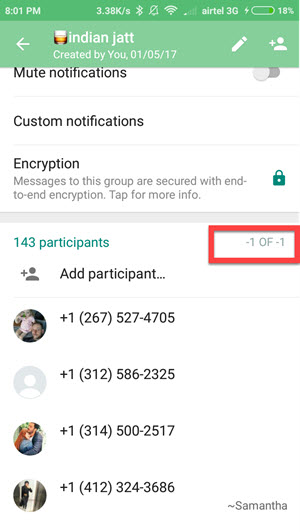
      当我遇到这个问题时,我分析了其他流行应用程序的布局:例如,whatsapp只使用 回收新闻 (或) ListViews 在他们的应用程序的某些部分。

      尤其, this group settings screen 上百种可能的物品是由多个 列表视图 被包裹 ScrollView ,没有任何视图回收。

    2. 更换 嵌套滚动视图 只有一个 ReyclerView with multiple item types 把你所有的可滚动内容都放进去。如果你需要查看回收,这是一条路。

      注意,您还必须转换 嵌套滚动视图 (页眉和页脚,间距)到 回收服务 有自己的项目 ViewHolders .

      如果设置相当简单,我建议您按照上面的链接,在没有附加库的情况下实现它。


    有几个不同的库可以解决您的问题(所有库都遵循第二种方法 回收服务 ,但大多数都附带了许多您可能不需要的额外功能:

    RendererRecyclerViewAdapter

    它带有一个 ViewRenderer / ViewModel interface ,其工作方式类似于 单个项目类型的“部分”RecyclerView。你可以创建一个 对于每个项类型,然后在单个适配器中注册它们。

    Epoxy

    Airbnb创建的一个库/框架,在他们的应用程序中大量使用。 它们有很多可滚动的内容(类似于网页),其中 很多不同的项目类型。环氧树脂也有助于 一个页面上的不同项,当 内容或其顺序更改。如果你只需要一个屏幕就太多了。

    Litho

    一个由facebook创建的完整的ui框架,它有自己的呈现引擎、xml布局的替代品等等。据我所知,它允许你处理大量的项目(比如facebook时间线),视图回收是自动处理的。像环氧树脂,你只会使用这个,如果你的应用程序包括像无尽的滚动与许多不同的项目类型,你真的需要的性能。


    我尝试了环氧树脂和renderrecyclerviewadapter,但毕竟我创建了自己的多项目类型适配器。它可以在不到100行的代码中创建。

        2
  •  0
  •   vishal bhalerao    8 年前

    我试过在每个recyclerview中添加20个条目来解决您的问题,使用nestedscrollview应用程序调用onbindViewHolder方法40次。当您禁止在Java代码中嵌套滚动时,我建议使用 滚动视图 . 通过使用ScrollView应用程序调用onBindViewHolder 33次。


    如果您将RecyclerView的高度设置为特定大小,而不是“匹配父级”,则会大大减少对OnBindViewHolder的调用。

    <ScrollView xmlns:android="http://schemas.android.com/apk/res/android"
    xmlns:app="http://schemas.android.com/apk/res-auto"
    xmlns:tools="http://schemas.android.com/tools"
    android:layout_width="match_parent"
    android:layout_height="match_parent"
    android:fillViewport="false">
    
    <android.support.v7.widget.LinearLayoutCompat
    android:layout_width="match_parent"
    android:layout_height="match_parent"
    android:orientation="vertical"
    tools:context="com.example.vishal.my2.MainActivity">
    <android.support.v7.widget.RecyclerView
        android:id="@+id/featured_list"
        android:layout_width="match_parent"
        android:layout_height="300dp" />
    
    <android.support.v7.widget.RecyclerView
        android:id="@+id/all_topic_list"
        android:layout_width="match_parent"
        android:layout_height="300dp" />
    </android.support.v7.widget.LinearLayoutCompat>
    </ScrollView>
    

    如果为RecyclerView的高度指定硬编码值不符合应用程序要求,则可以尝试使用 列表视图 而不是RecyclerView。如果我错了,请原谅,这是我第一次回答任何问题。

        3
  •  -1
  •   jatin rana    8 年前

    将此添加到嵌套滚动视图 android:fillViewport="false"