代码之家  ›  专栏  ›  技术社区  ›  Bryan Roth

在WinForm标签中设置文本格式

  •  20
  • Bryan Roth  · 技术社区  · 18 年前

    是否可以在WinForm标签中格式化某些文本,而不是将文本拆分为多个标签?请忽略标签文本中的HTML标记;它只是用来表达我的观点。

    例如:

    Dim myLabel As New Label
    myLabel.Text = "This is <b>bold</b> text.  This is <i>italicized</i> text."
    

    它将在标签中产生如下文本:

    这是 大胆的 文本。这是 斜体字 文本。

    12 回复  |  直到 18 年前
        1
  •  18
  •   TheSmurf    18 年前

    使用winforms标签是不可能的。标签必须只有一种字体,只有一种尺寸和一个面。您有几个选择:

    1. 使用单独的标签
    2. 创建一个新的控件派生类,该类通过gdi+绘制自己的图形,并使用该类而不是标签;这可能是您最好的选择,因为它可以完全控制如何指示控件设置其文本格式。
    3. 使用允许插入HTML代码段的第三方标签控件(有一个多检查代码项目);这将是其他人对2的实现。
        2
  •  15
  •   ageektrapped    18 年前

    不是,但是你可以用一个只读的无边框的richtextbox来伪造它。RichTextBox支持RTF格式。

        3
  •  10
  •   Community Mohan Dere    9 年前

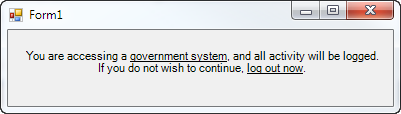
    另一个解决方法,在派对后期:如果你不想使用第三方控件,而你只是想引起人们对标签中某些文本的注意, 和 您可以使用下划线,您可以使用 LinkLabel .

    注意,很多人认为这是 usability crime 但是,如果您没有为最终用户的消费设计一些东西,那么它可能是您准备好的良心上的东西。

    技巧是将禁用的链接添加到要加下划线的文本部分,然后全局设置链接颜色以匹配标签的其余部分。除了 Links.Add() 一块,但这里的代码是:

    linkLabel1.Text = "You are accessing a government system, and all activity " +
                      "will be logged.  If you do not wish to continue, log out now.";
    linkLabel1.AutoSize = false;
    linkLabel1.Size = new Size(365, 50);
    linkLabel1.TextAlign = ContentAlignment.MiddleCenter;
    linkLabel1.Links.Clear();
    linkLabel1.Links.Add(20, 17).Enabled = false;   // "government system"
    linkLabel1.Links.Add(105, 11).Enabled = false;  // "log out now"
    linkLabel1.LinkColor = linkLabel1.ForeColor;
    linkLabel1.DisabledLinkColor = linkLabel1.ForeColor;
    

    结果:

    enter image description here

        4
  •  8
  •   Community Mohan Dere    9 年前

    为我工作的解决方案-使用自定义richeditbox。有了正确的属性,它将看起来像是带有粗体支持的简单标签。

    1) 首先,添加带有禁用插入符号的自定义richtextlabel类:

    public class RichTextLabel : RichTextBox
    {
        public RichTextLabel()
        {
            base.ReadOnly = true;
            base.BorderStyle = BorderStyle.None;
            base.TabStop = false;
            base.SetStyle(ControlStyles.Selectable, false);
            base.SetStyle(ControlStyles.UserMouse, true);
            base.SetStyle(ControlStyles.SupportsTransparentBackColor, true);
    
            base.MouseEnter += delegate(object sender, EventArgs e)
            {
                this.Cursor = Cursors.Default;
            };
        }
    
        protected override void WndProc(ref Message m)
        {
            if (m.Msg == 0x204) return; // WM_RBUTTONDOWN
            if (m.Msg == 0x205) return; // WM_RBUTTONUP
            base.WndProc(ref m);
        }
    }
    

    2) 将句子拆分为带有IsSelected标志的单词,以确定该单词应为粗体还是否:

            private void AutocompleteItemControl_Load(object sender, EventArgs e)
        {
            RichTextLabel rtl = new RichTextLabel();
            rtl.Font = new Font("MS Reference Sans Serif", 15.57F);
            StringBuilder sb = new StringBuilder();
            sb.Append(@"{\rtf1\ansi ");
            foreach (var wordPart in wordParts)
            {
                if (wordPart.IsSelected)
                {
                    sb.Append(@"\b ");
                }
                sb.Append(ConvertString2RTF(wordPart.WordPart));
                if (wordPart.IsSelected)
                {
                    sb.Append(@"\b0 ");
                }
            }
            sb.Append(@"}");
    
            rtl.Rtf = sb.ToString();
            rtl.Width = this.Width;
            this.Controls.Add(rtl);
        }
    

    3) 添加用于将文本转换为有效RTF的函数(支持Unicode!):

       private string ConvertString2RTF(string input)
        {
            //first take care of special RTF chars
            StringBuilder backslashed = new StringBuilder(input);
            backslashed.Replace(@"\", @"\\");
            backslashed.Replace(@"{", @"\{");
            backslashed.Replace(@"}", @"\}");
    
            //then convert the string char by char
            StringBuilder sb = new StringBuilder();
            foreach (char character in backslashed.ToString())
            {
                if (character <= 0x7f)
                    sb.Append(character);
                else
                    sb.Append("\\u" + Convert.ToUInt32(character) + "?");
            }
            return sb.ToString();
        }
    

    Sample

    对我来说真是一种魅力! 解决方案编译自:

    How to convert a string to RTF in C#?

    Format text in Rich Text Box

    How to hide the caret in a RichTextBox?

        5
  •  5
  •   Phil    17 年前
    1. 在写字板中将文本创建为RTF文件
    2. 创建不带边框和editable=false的RTF控件
    3. 将rtf文件作为资源添加到项目中
    4. 在表格1中加载do

      myrtfcontrol.rtf=资源1.myrtfcontrolText

        6
  •  3
  •   Martin Braun    8 年前

    自动标记

    AutoRichLabel with formatted RTF content

    我是通过建立一个 UserControl 包含一个 TransparentRichTextBox 这是只读的。这个 透明文本框 是一个 RichTextBox 允许透明:

    透明文本框.cs:

    public class TransparentRichTextBox : RichTextBox
    {
        [DllImport("kernel32.dll", CharSet = CharSet.Auto)]
        static extern IntPtr LoadLibrary(string lpFileName);
    
        protected override CreateParams CreateParams
        {
            get
            {
                CreateParams prams = base.CreateParams;
                if (TransparentRichTextBox.LoadLibrary("msftedit.dll") != IntPtr.Zero)
                {
                    prams.ExStyle |= 0x020; // transparent 
                    prams.ClassName = "RICHEDIT50W";
                }
                return prams;
            }
        }
    }
    

    决赛 用户控制 充当的包装器 透明文本框 . 不幸的是,我不得不把它限制在 AutoSize 以我自己的方式,因为 自动大小 的 多格式文本框 破碎了。

    autorichlabel.designer.cs:自动RichLabel.designer.cs:

    partial class AutoRichLabel
    {
        /// <summary> 
        /// Required designer variable.
        /// </summary>
        private System.ComponentModel.IContainer components = null;
    
        /// <summary> 
        /// Clean up any resources being used.
        /// </summary>
        /// <param name="disposing">true if managed resources should be disposed; otherwise, false.</param>
        protected override void Dispose(bool disposing)
        {
            if (disposing && (components != null))
            {
                components.Dispose();
            }
            base.Dispose(disposing);
        }
    
        #region Component Designer generated code
    
        /// <summary> 
        /// Required method for Designer support - do not modify 
        /// the contents of this method with the code editor.
        /// </summary>
        private void InitializeComponent()
        {
            this.rtb = new TransparentRichTextBox();
            this.SuspendLayout();
            // 
            // rtb
            // 
            this.rtb.BorderStyle = System.Windows.Forms.BorderStyle.None;
            this.rtb.Dock = System.Windows.Forms.DockStyle.Fill;
            this.rtb.Location = new System.Drawing.Point(0, 0);
            this.rtb.Margin = new System.Windows.Forms.Padding(0);
            this.rtb.Name = "rtb";
            this.rtb.ReadOnly = true;
            this.rtb.ScrollBars = System.Windows.Forms.RichTextBoxScrollBars.None;
            this.rtb.Size = new System.Drawing.Size(46, 30);
            this.rtb.TabIndex = 0;
            this.rtb.Text = "";
            this.rtb.WordWrap = false;
            this.rtb.ContentsResized += new System.Windows.Forms.ContentsResizedEventHandler(this.rtb_ContentsResized);
            // 
            // AutoRichLabel
            // 
            this.AutoScaleDimensions = new System.Drawing.SizeF(6F, 13F);
            this.AutoScaleMode = System.Windows.Forms.AutoScaleMode.Font;
            this.AutoSizeMode = System.Windows.Forms.AutoSizeMode.GrowAndShrink;
            this.BackColor = System.Drawing.Color.Transparent;
            this.Controls.Add(this.rtb);
            this.Name = "AutoRichLabel";
            this.Size = new System.Drawing.Size(46, 30);
            this.ResumeLayout(false);
    
        }
    
        #endregion
    
        private TransparentRichTextBox rtb;
    }
    

    autorichlabel.cs:自动标签:

    /// <summary>
    /// <para>An auto sized label with the ability to display text with formattings by using the Rich Text Format.</para>
    /// <para>­</para>
    /// <para>Short RTF syntax examples: </para>
    /// <para>­</para>
    /// <para>Paragraph: </para>
    /// <para>{\pard This is a paragraph!\par}</para>
    /// <para>­</para>
    /// <para>Bold / Italic / Underline: </para>
    /// <para>\b bold text\b0</para>
    /// <para>\i italic text\i0</para>
    /// <para>\ul underline text\ul0</para>
    /// <para>­</para>
    /// <para>Alternate color using color table: </para>
    /// <para>{\colortbl ;\red0\green77\blue187;}{\pard The word \cf1 fish\cf0  is blue.\par</para>
    /// <para>­</para>
    /// <para>Additional information: </para>
    /// <para>Always wrap every text in a paragraph. </para>
    /// <para>Different tags can be stacked (i.e. \pard\b\i Bold and Italic\i0\b0\par)</para>
    /// <para>The space behind a tag is ignored. So if you need a space behind it, insert two spaces (i.e. \pard The word \bBOLD\0  is bold.\par)</para>
    /// <para>Full specification: http://www.biblioscape.com/rtf15_spec.htm </para>
    /// </summary>
    public partial class AutoRichLabel : UserControl
    {
        /// <summary>
        /// The rich text content. 
        /// <para>­</para>
        /// <para>Short RTF syntax examples: </para>
        /// <para>­</para>
        /// <para>Paragraph: </para>
        /// <para>{\pard This is a paragraph!\par}</para>
        /// <para>­</para>
        /// <para>Bold / Italic / Underline: </para>
        /// <para>\b bold text\b0</para>
        /// <para>\i italic text\i0</para>
        /// <para>\ul underline text\ul0</para>
        /// <para>­</para>
        /// <para>Alternate color using color table: </para>
        /// <para>{\colortbl ;\red0\green77\blue187;}{\pard The word \cf1 fish\cf0  is blue.\par</para>
        /// <para>­</para>
        /// <para>Additional information: </para>
        /// <para>Always wrap every text in a paragraph. </para>
        /// <para>Different tags can be stacked (i.e. \pard\b\i Bold and Italic\i0\b0\par)</para>
        /// <para>The space behind a tag is ignored. So if you need a space behind it, insert two spaces (i.e. \pard The word \bBOLD\0  is bold.\par)</para>
        /// <para>Full specification: http://www.biblioscape.com/rtf15_spec.htm </para>
        /// </summary>
        [Browsable(true)]
        public string RtfContent
        {
            get
            {
                return this.rtb.Rtf;
            }
            set
            {
                this.rtb.WordWrap = false; // to prevent any display bugs, word wrap must be off while changing the rich text content. 
                this.rtb.Rtf = value.StartsWith(@"{\rtf1") ? value : @"{\rtf1" + value + "}"; // Setting the rich text content will trigger the ContentsResized event. 
                this.Fit(); // Override width and height. 
                this.rtb.WordWrap = this.WordWrap; // Set the word wrap back. 
            }
        }
    
        /// <summary>
        /// Dynamic width of the control. 
        /// </summary>
        [Browsable(false)]
        public new int Width
        {
            get
            {
                return base.Width;
            } 
        }
    
        /// <summary>
        /// Dynamic height of the control. 
        /// </summary>
        [Browsable(false)]
        public new int Height
        {
            get
            {
                return base.Height;
            }
        }
    
        /// <summary>
        /// The measured width based on the content. 
        /// </summary>
        public int DesiredWidth { get; private set; }
    
        /// <summary>
        /// The measured height based on the content. 
        /// </summary>
        public int DesiredHeight { get; private set; }
    
        /// <summary>
        /// Determines the text will be word wrapped. This is true, when the maximum size has been set. 
        /// </summary>
        public bool WordWrap { get; private set; }
    
        /// <summary>
        /// Constructor. 
        /// </summary>
        public AutoRichLabel()
        {
            InitializeComponent();
        }
    
        /// <summary>
        /// Overrides the width and height with the measured width and height
        /// </summary>
        public void Fit()
        {
            base.Width = this.DesiredWidth;
            base.Height = this.DesiredHeight;
        }
    
        /// <summary>
        /// Will be called when the rich text content of the control changes. 
        /// </summary>
        private void rtb_ContentsResized(object sender, ContentsResizedEventArgs e)
        {
            this.AutoSize = false; // Disable auto size, else it will break everything
            this.WordWrap = this.MaximumSize.Width > 0; // Enable word wrap when the maximum width has been set. 
            this.DesiredWidth = this.rtb.WordWrap ? this.MaximumSize.Width : e.NewRectangle.Width; // Measure width. 
            this.DesiredHeight = this.MaximumSize.Height > 0 && this.MaximumSize.Height < e.NewRectangle.Height ? this.MaximumSize.Height : e.NewRectangle.Height; // Measure height. 
            this.Fit(); // Override width and height. 
        }
    }
    

    富文本格式的语法非常简单:

    段落:

    {\pard This is a paragraph!\par}
    

    粗体/斜体/下划线文本:

    \b bold text\b0
    \i italic text\i0
    \ul underline text\ul0
    

    使用颜色表替换颜色:

    {\colortbl ;\red0\green77\blue187;}
    {\pard The word \cf1 fish\cf0  is blue.\par
    

    但请注意:每段文字都要换行。此外,还可以堆叠不同的标签(即 \pard\b\i Bold and Italic\i0\b0\par )标记后面的空格字符被忽略。因此,如果您需要在其后面插入两个空格(即 \pard The word \bBOLD\0 is bold.\par )逃走 \ 或 { 或 } ,请使用前导 \ . 有关更多信息,请参见 full specification of the rich text format online .

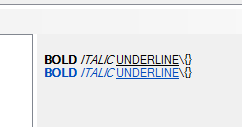
    使用这个非常简单的语法,您可以生成类似于在第一个图像中看到的内容。附加到 RtfContent 我的财产 AutoRichLabel 在第一张图片中是:

    {\colortbl ;\red0\green77\blue187;}
    {\pard\b BOLD\b0  \i ITALIC\i0  \ul UNDERLINE\ul0 \\\{\}\par}
    {\pard\cf1\b BOLD\b0  \i ITALIC\i0  \ul UNDERLINE\ul0\cf0 \\\{\}\par}
    

    AutoRichLabel with formatted RTF content

    如果要启用自动换行,请将最大宽度设置为所需的大小。但是,即使文本较短,也会将宽度固定为最大宽度。

    玩得高兴!

        7
  •  2
  •   Uwe Keim    14 年前

    2009年有一篇优秀的关于代码项目的文章命名为” A Professional HTML Renderer You Will Use “它实现了与原始海报想要的相似的功能。

    我在我们的几个项目中成功地使用了它。

        8
  •  2
  •   bitoiu    12 年前

    非常简单的解决方案:

    1. 在表单上添加2个标签,labela和labelb
    2. 转到Labela的属性并将其停靠在左侧。
    3. 转到labelb的属性并将其停靠在左侧。
    4. 对于labela,将字体设置为粗体。

    现在labelb将根据labela文本的长度进行移动。

    这就是全部。

        9
  •  1
  •   Martin    18 年前

    我也很想知道是否有可能。

    当我们找不到解决方案时,我们求助于组件的“SuperLabel”控件,该控件允许在标签中使用HTML标记。

        10
  •  1
  •   pKami    12 年前

    意识到这是一个古老的问题,我的答案更适合像我这样仍在寻找此类解决方案并偶然发现此问题的人。

    除了前面提到的,DevExpress的 LabelControl 是支持此行为的标签- demo here . 唉,它是付费图书馆的一部分。

    如果你在寻找免费的解决方案,我相信 HTML Renderer 其次是最好的。

        11
  •  0
  •   jakebic    12 年前

    一个flowlayoutpanel可以很好地解决您的问题。如果将标签添加到“流”面板并设置每个标签的字体和边距属性的格式,则可以具有不同的字体样式。很快很容易就能解决问题。

        12
  •  0
  •   Marinpietri    11 年前

    是啊。 可以使用HTML呈现实现。 如需了解,请单击链接: https://htmlrenderer.codeplex.com/ 我希望这是有用的。

    推荐文章